




















Running
Trending
All ArticlesRunning
How to Train for a Marathon (and Half Marathon)

Buying Guides
Nike Leggings: The Ultimate Guide and FAQ

Running
Running for Beginners: Everything You Need to Know

Buying Guides
The Best Sports Bras for Gym Workouts
Shoe Reviews
How to Find the Best Gym Shoes: The Complete Guide

Running
Best Running Leggings for Women: The Pairs Worth Every Mile
Earn points towards free products, discounts & more
You are not currently logged in
Your cart is empty
Your cart
Free Delivery over £70
30 Day, No Quibble Returns Policy
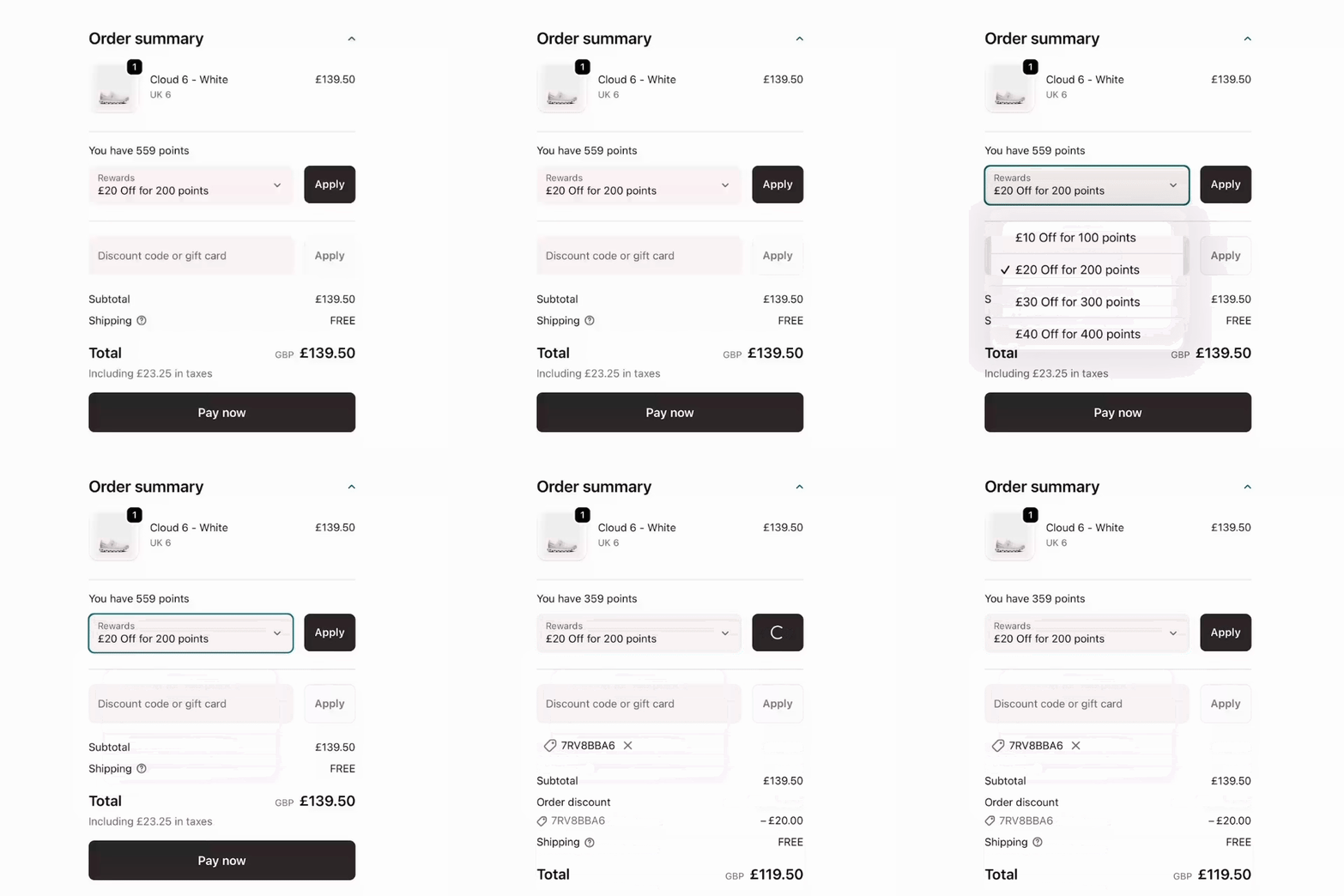
How to use your points
1. Add your favourites to your basket and head to checkout.
2. Click ‘Add discount’, then select ‘Rewards’ from the dropdown menu.
3. Choose how many points you’d like to redeem (based on your balance), apply the discount, and complete your checkout.
To be a part of TSE Club, create an account and you’re in! 🎉 You’ll automatically be enrolled and gain access to your points and rewards.
Shopped with us before signing up? No stress. Any points you earned within the past year will still be waiting for you once your account is set up.
Every shop earns you points – simple as that. Plus, keep an eye out for our Double Points Days, when you can earn twice as many points on your purchases for a limited time.
Turn your TSE Club points into perks in just a few taps. Add your favourites to your basket and head to checkout. You’ll see an ‘Add discount’ button - click this, then select ‘Rewards’ from the dropdown menu. Choose how many points you’d like to redeem (based on your available balance), apply the discount, and you’re good to go.
TSE Club Tier 3 means free shipping, every time. No minimum spend, no fuss. At checkout, your free shipping perk will automatically apply to your order 🚚.
Your points are on their way! After your purchase, please allow 30 days for your points to be added to your account.
All TSE Club points expire after 1 year if they’re not used, so make sure you redeem them before they time out!
Sometimes your points needs a quick warm-up. If you’re logged in and you’ve placed an order within the last 12 months, try refreshing the page and waiting a few seconds for your balance to appear.
Yes. If you return an order, the points from that purchase will be put back into your account. Please allow up to 30 days for them to show in your points balance